Your First Real Agent
Built with an SDK, understood without one: tools, memory, and the loop wired into one research agent over the awesome lists.

I asked an agent to find me Go libraries for building CLIs. Two minutes later it came back with urfave/cli , go-flags , and argparse , each with a repo URL and a one-line reason for why it fit.
Then I asked the same agent about Rust CLI frameworks.
Its first move, before any search, was to pull up the Go finding from the run before. The summary opened with “Prior related work: From Awesome Go’s Command Line section…” That was when agent stopped being a word I had read about and started being a program I had built.
It was also when I realized how small that program was. I scrolled up to look at what I had actually built and “the agent” was four small tool functions, a memory class, and a system prompt.
This post builds that agent: tools, memory, and the loop, wired into one thing that researches the github.com/sindresorhus/awesome lists and cites its sources. We build it with the OpenAI Agents SDK and then look underneath, because the parts the SDK hands you and the parts you bring yourself are not the parts most people expect.
TL;DR
- The SDK gives you the loop. Tools and memory are libraries you bring yourself, with or without a framework.
- A real agent is not any one of those pieces. It is the loop $+$ the tools $+$ the memory $+$ the prompt that ties them together.
- We wire all four into a single research agent and run it live against the awesome lists, twice, so the second run can remember the first.
- The load-bearing choices (the prompt, the model, max_turns, what is worth remembering) are the difference between a demo and something you would actually trust.
What “real” means
A “real” agent is not a bigger prompt, and it is not a smarter model. Swapping in a larger context window or a stronger model makes each individual response better; it does not make the thing an agent.
What makes it an agent is structure:
- The loop that lets it act more than once.
- The tools that let it act on the world.
- The memory that lets it carry something between runs.
- The prompt that ties those three together into a job.
That is the whole synthesis. In the context of this post:
- The tools are typed Python functions the model can ask to run, like a search over an index and a fetch from a URL.
- The memory is a small wrapper around a local vector store: write a finding, retrieve related ones later.
- The loop is the turn-by-turn cycle that calls the model, runs whatever tool the model asks for, feeds the result back, and stops when the model says it is done.
- The prompt is the system instruction that tells the agent what its job is and names the termination condition explicitly.
None of those is an agent on its own. Put all four pieces in one file, point them at a task, and you get one. We will build it with the OpenAI Agents SDK, because the SDK owns the loop and that is the part you least want to hand-roll.
But we will also peek at the raw loop underneath, the plain while cycle the SDK is wrapping, so the agent is understood without the SDK too. The framework is a convenience here, not a dependency you need in your head.
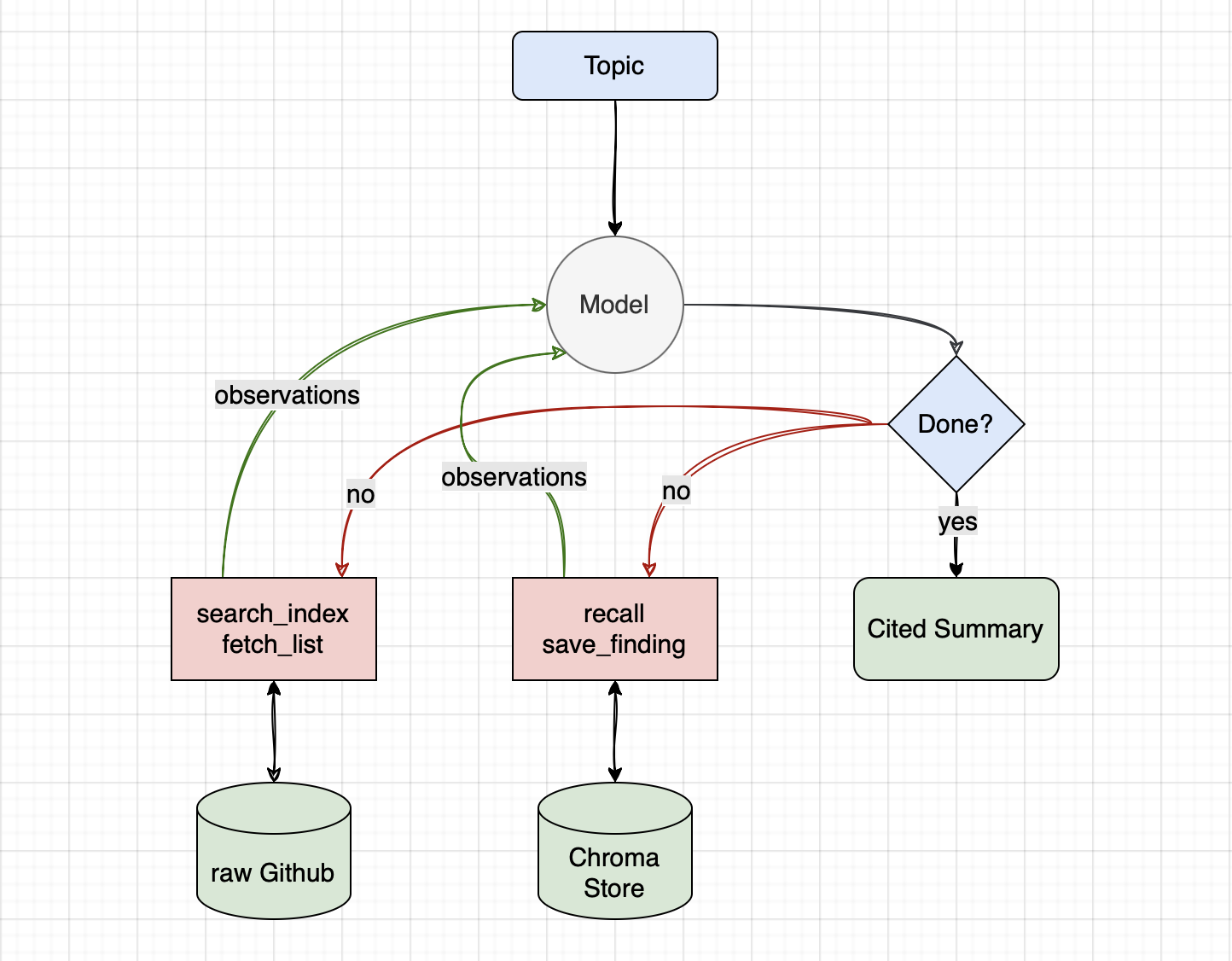
Workflow
The loop in the middle, the model deciding whether it is done and acting again if not, is the part the SDK owns (covered in depth in “Why Your Agent Goes In Circles?”
). The research tools on one side (search_index, fetch_list) are typed Python functions the model can call (covered in “Tools: How Agents Perform Actions?”
). The memory tools on the other side (recall, save_finding) read and write a local vector store (covered in “Memory: Why Your Agent Forgets You?”
). GitHub is the external world the agent reaches into, and the cited summary is what falls out when the loop decides it has enough.
The job: researching the awesome lists
The agent researches github.com/sindresorhus/awesome
. That repo is a curated index: roughly 500 entries, each a one-line link to a topic-specific awesome list, grouped under about 30 category headings. Each of those sub-lists is itself a large structured markdown file. awesome-go alone runs past a thousand entries. So the index is a map, and the real content lives one hop down.
That shape is why this is research and not a lookup. To answer “Go libraries for building CLIs,” the agent has to read the index, pick the right sub-list, search inside it, and synthesise a cited answer from what it finds. There is no single tool call that returns the answer. It is a multi-hop loop: fetch, narrow, fetch again, then write.
The agent fetches GitHub live at runtime. The transcripts later in this post are from a dated run on 2026-05-14, and a reader running the companion will get different output: the lists change, the model picks different entries, the wording shifts. That is the nature of live research, not a bug.
The raw loop, no SDK
Before the SDK, sixty seconds on the loop itself. It is a while cycle that:
- Calls the model,
- Runs whatever tools it asks for,
- Feeds the results back, and
- Stops when the model returns no tool calls.
That is the whole agent runtime, and any SDK you ever pick up is doing some version of this for you. Here it is driving the real research tools we will use for the rest of the post.
# Plain Python ReAct loop, no SDK. The shipped companion uses the SDK instead.
import json
from openai import OpenAI

client = OpenAI()
messages = [
    {"role": "system", "content": SYSTEM_PROMPT},
    {"role": "user", "content": "Go libraries for building CLIs"},
]

for _ in range(MAX_ITERS):
    resp = client.chat.completions.create(
        model="gpt-5", messages=messages, tools=TOOLS,
    )
    msg = resp.choices[0].message
    if not msg.tool_calls:                       # the model is done
        print(msg.content)
        break
    messages.append(msg)
    for call in msg.tool_calls:                  # run each tool, feed results back
        args = json.loads(call.function.arguments or "{}")
        result = dispatch(call.function.name, args)  # search_index / fetch_list / ...
        messages.append({
            "role": "tool", "tool_call_id": call.id, "content": result,
        })
This snippet is illustrative, not the shipped companion file. SYSTEM_PROMPT, TOOLS, dispatch, and MAX_ITERS are the usual ReAct wiring (“Why Your Agent Goes In Circles?”
builds the full version). The SDK’s job is to run exactly this loop for you, so you can spend your attention on the tools, the memory, and the prompt instead of the plumbing.
Building it with the SDK
Now we build the same thing with the OpenAI Agents SDK, and walk every piece. The whole file is agent.py
; we take it in three parts here: the four tools the agent can call, the two memory layers it carries, and the Agent itself plus the loop that runs it.
The tools. @function_tool turns a plain typed Python function into something the model can call, and the docstring is the description the model sees, so it is doing real work, not decoration. fetch_list returns only the lines that match the query because the awesome lists are far too big to hand over whole. Both tools print a line when they run, so the loop is visible in the terminal as it happens.
def _get(url: str) -> str | None:
    """Fetch a URL, return its text, or None on any failure."""
    try:
        response = httpx.get(url, timeout=HTTP_TIMEOUT, follow_redirects=True)
    except httpx.HTTPError:
        return None
    if response.status_code != 200:
        return None
    return response.text


# --- research tools ---------------------------------------------------------

@function_tool
def search_index(topic: str) -> str:
    """Search the awesome index for lists related to a topic.

    Fetches github.com/sindresorhus/awesome and returns the index
    entries that mention the topic, each with its list's repo URL.
    """
    print(f"  search_index(topic={topic!r})")
    text = _get(AWESOME_INDEX_URL)
    if text is None:
        return "error: could not fetch the awesome index"
    return filter_lines(text, topic, limit=40)


@function_tool
def fetch_list(url: str, query: str) -> str:
    """Fetch one awesome list and return entries matching a query.

    `url` is a github.com/owner/repo URL from search_index. The list is
    too large to return whole, so only lines mentioning `query` come
    back.
    """
    print(f"  fetch_list(url={url!r}, query={query!r})")
    candidates = normalize_repo_url(url)
    if not candidates:
        return f"error: '{url}' is not a github.com/owner/repo URL"
    for candidate in candidates:
        text = _get(candidate)
        if text is not None:
            return filter_lines(text, query, limit=60)
    return f"error: could not fetch a README for {url}"
The memory. A Memory class wraps a local Chroma collection:
remember(text)stores a finding embedded bytext-embedding-3-small;recall(query, k)returns the k most-relevant prior findings, namespaced per user.
That is the durable, cross-run layer (“Memory: Why Your Agent Forgets You?”
walks the same code in detail). The thing to notice is that recall and save_finding are just two more @function_tools. From the loop’s point of view memory is not special; it is two tools that happen to read and write a vector store instead of GitHub.
class Memory:
    """Tiny vector-store memory over a local Chroma collection.

    remember(text)      store a finding, embedded by text-embedding-3-small.
    recall(query, k=3)  retrieve the k most-relevant prior findings.

    Per-user namespacing via metadata at write time and a where filter
    at read time.
    """

    def __init__(self, persist_dir: Path, user_id: str):
        self.user_id = user_id
        client = chromadb.PersistentClient(path=str(persist_dir))
        embedder = OpenAIEmbeddingFunction(
            api_key=os.environ["OPENAI_API_KEY"],
            model_name="text-embedding-3-small",
        )
        self.collection = client.get_or_create_collection(
            name="research_memory",
            embedding_function=embedder,
        )

    def remember(self, text: str) -> None:
        self.collection.add(
            ids=[str(uuid.uuid4())],
            documents=[text],
            metadatas=[{"user_id": self.user_id}],
        )

    def recall(self, query: str, k: int = 3) -> list[str]:
        result = self.collection.query(
            query_texts=[query],
            n_results=k,
            where={"user_id": self.user_id},
        )
        return result.get("documents", [[]])[0]


# Module-global so the @function_tool callbacks below can see it. main()
# assigns it once OPENAI_API_KEY is confirmed present.
_memory: Memory | None = None


@function_tool
def recall(query: str) -> str:
    """Recall prior research findings relevant to a query."""
    print(f"  recall(query={query!r})")
    assert _memory is not None
    hits = _memory.recall(query, k=3)
    if not hits:
        return "(no matching memory)"
    return "\n".join(f"- {h}" for h in hits)


@function_tool
def save_finding(finding: str) -> str:
    """Save a research finding so future runs can recall it."""
    print("  save_finding(...)")
    assert _memory is not None
    _memory.remember(finding)
    return "stored"
The agent and the loop. Two decisions here are deliberate. The system prompt names the termination condition explicitly (“when you have written the summary and saved the finding, stop”), so the model knows when the job is done rather than guessing. And max_turns gives the loop a budget you control, a hard ceiling on how many times it can act.
One more thing worth naming: SQLiteSession(":memory:") is the in-run conversation history, the short-term memory layer that holds the turn-by-turn messages for this single run, separate from the Chroma store that persists across runs.
SYSTEM_PROMPT = """You are a research agent for the awesome lists
(github.com/sindresorhus/awesome).

Given a topic, do this:
1. Call recall first to see if you have relevant prior findings. If
   recall returns anything related, mention it in your final summary
   as prior related work and how it connects to this topic.
2. Call search_index to find the awesome list that fits the topic.
3. Call fetch_list ONCE on the most promising list's URL, with a single
   broad query (such as the section name) that narrows it to the topic.
   The result already contains many entries, so do not call fetch_list
   again per project name. Only fetch a second list if the first was
   the wrong list entirely.
4. Write a short cited summary: the top 3-5 projects, each as
   'name - repo URL - one line on why it fits'.
5. Call save_finding with a one-paragraph summary of what you found.

When you have written the summary and saved the finding, stop. Do not
call more tools after that.
"""


def build_agent() -> Agent:
    return Agent(
        name="researcher",
        instructions=SYSTEM_PROMPT,
        tools=[recall, search_index, fetch_list, save_finding],
        model=MODEL,
    )


def main(argv: list[str]) -> int:
    if len(argv) < 2 or not argv[1].strip():
        print("usage: uv run python agent.py '<topic>'", file=sys.stderr)
        return 1
    if not os.environ.get("OPENAI_API_KEY"):
        print("OPENAI_API_KEY is not set", file=sys.stderr)
        return 1

    global _memory
    MEMORY_DIR.mkdir(exist_ok=True)
    _memory = Memory(MEMORY_DIR, user_id=USER_ID)

    topic = argv[1].strip()
    agent = build_agent()
    session = SQLiteSession(":memory:")

    print(f"researching: {topic}\n")
    result = Runner.run_sync(agent, topic, session=session, max_turns=MAX_TURNS)
    print(f"\n{result.final_output}")
    return 0
Here is a real run, captured on 2026-05-14. A reader running the companion will get different output, because the agent fetches GitHub live and the lists, the model’s picks, and the wording all shift.
researching: Go libraries for building CLIs

  recall(query='Go libraries for building CLIs')
  search_index(topic='Go CLI')
  search_index(topic='Go')
  fetch_list(url='https://github.com/avelino/awesome-go#readme', query='Command Line')
  save_finding(...)

Top Go CLI libraries (from Awesome Go)
- urfave/cli - https://github.com/urfave/cli - Mature, fast framework for commands, flags, and subcommands.
- go-flags - https://github.com/jessevdk/go-flags - Powerful POSIX/GNU-style option parsing via struct tags.
- argparse - https://github.com/akamensky/argparse - Python argparse-style argument parsing for Go.
- teris-io/cli - https://github.com/teris-io/cli - Minimal, composable API for building command hierarchies.
- gocmd - https://github.com/devfacet/gocmd - Lightweight helpers for structuring command-line apps.

Notes: kingpin (https://github.com/alecthomas/kingpin) is listed but marked as superseded by Kong in Awesome Go. Source: https://github.com/avelino/awesome-go#readme (Command Line section)

Prior related work: none found in recall.
That run, end to end. recall came back empty because nothing is in memory yet on a first run. search_index found the list, though it took two tries to land on the right index entries. fetch_list narrowed awesome-go down to its Command Line section, the model synthesised the cited summary from those lines, and save_finding stored that summary so the next run can recall it. One model loop, several tool calls, exactly the cycle from the raw snippet above.
Grab the companion from github
(agent.py, a pyproject.toml, and a README). Clone it, uv sync, set your OPENAI_API_KEY, and run it yourself:
uv run python agent.py 'Go libraries for building CLIs'
What Runner.run is doing here
Runner.run_sync is the same loop you saw in the raw snippet above, packaged. Call the model, run the tool calls it asked for, feed the results back, repeat until the model stops asking, and bail if a turn budget is reached. There is nothing more under there.
If you want the proof rather than my word for it, “Why Your Agent Goes In Circles?”
pins a line-referenced excerpt from the actual openai-agents source: the real while loop, with the max_turns check that stops it from spinning forever. What the SDK adds on top of the bare loop is operational scaffolding (guardrails, session management, lifecycle hooks, retries), and that is worth having, but it is not this post.
Memory across runs
The first run saved a finding. The second run, on a related topic, opens by recalling it. That is the whole point of durable memory: the agent is not starting cold.
researching: CLI frameworks in Rust

  recall(query='Rust CLI frameworks, awesome lists top projects')
  search_index(topic='rust cli frameworks')
  search_index(topic='rust')
  fetch_list(url='https://github.com/rust-unofficial/awesome-rust#readme', query='Command-line')
  save_finding(...)

Prior related work: From Awesome Go's Command Line section, notable CLI libraries include urfave/cli, go-flags, and argparse. This parallels Rust's ecosystem where a single dominant parser/framework (clap) covers most needs, with a separate toolkit (promkit) for interactive flows.

Top Rust CLI frameworks (from Awesome Rust):
- clap - https://github.com/clap-rs/clap - Full-featured command-line argument parser and framework for building CLIs [awesome-rust]
- promkit - https://github.com/ynqa/promkit - Toolkit for building interactive command-line tools (prompts/UX) [awesome-rust]

Saved finding: Searched Awesome Rust and found clap as the primary, full-featured CLI argument parser/framework and promkit as an interactive CLI toolkit; the section contained many end-user CLIs but few frameworks. Compared to Awesome Go's CLI libraries, Rust's list emphasizes clap as the de facto standard for commands/flags, with promkit addressing interactive experiences.
This run was captured on 2026-05-14 too. As with the first one, a reader running the companion will get different output, because the agent fetches GitHub live.
Notice that the very first line of work is recall. Its result is why the summary opens with “Prior related work: From Awesome Go’s Command Line section…” even though run 2 never searched anything Go: that context came back from memory, not from this run’s fetches.
Here is the split that makes it work. SQLiteSession(":memory:") is in-run history; it vanishes when the process exits, so on its own every run would start cold. The Chroma store under .research-memory/ is what actually carried the Go finding from run 1 into run 2. You want both, for different reasons: one keeps a single run coherent, the other makes runs accumulate.
What the other SDKs call this
| Piece | OpenAI Agents SDK | Anthropic Messages API | Google ADK |
|---|---|---|---|
| Agent definition | Agent(name=, instructions=, tools=, model=) |
A system prompt plus tools= on client.messages.create |
Agent(name=, instruction=, tools=, model=) |
| Tool definition | @function_tool decorator |
A JSON schema dict in tools=, dispatched by you |
A plain Python function passed to tools= |
| The loop | Runner.run / Runner.run_sync |
You write the while yourself |
Runner.run over a session |
| In-run history | SQLiteSession |
The messages list you maintain |
Session via a SessionService |
| Durable memory | Bring your own (Chroma here) | Bring your own | MemoryService, or bring your own |
Three vocabularies, one shape. The agent you just built is an Agent plus four tools plus Runner.run plus a Chroma store; rename the parts and it is the same program on any of the three SDKs. The one row that is bring-your-own almost everywhere is durable memory, and that is the point of the memory post: memory is a library decision, not an SDK feature.
This is also a footgun
This agent works, but a working demo hides three sharp edges.
Live fetch is non-deterministic, and the internet is not your friend. Runs differ from each other. GitHub rate-limits anonymous fetches. And you are feeding untrusted internet markdown straight into the model’s context: an awesome list could contain text crafted to redirect the agent. That is prompt injection, and will be covered in upcoming posts.
Memory grows, and wrong findings persist. Every run appends to the Chroma store. Nothing prunes it, nothing corrects it. A summary that was wrong on Tuesday is still there on Friday, and recall will surface it with the same confidence as a good one.
The agent treats the list as ground truth. An awesome list is one maintainer’s opinion, and it may be years stale. The agent summarises it as fact. “It is on the awesome list” is not the same as “it is the right tool for your job.”
What’s next
We will be covering guardrails, including escalation and human checkpoints in upcoming posts.
We will also cover multi-agent systems: orchestrators that route work, subagents that own a piece of it, and delegation as a design choice.
If you have a first-real-agent story that bit you in production, write to me at sumit at allthingsagentic dot org . The next posts’ examples lean toward what people are actually struggling with.